¶ Removing external programs that interfere with RuneLite
Many GPU overlay programs cause this problem; usually, removing them is the best option. Click here for a full list of flagged programs.
¶ Disabling hardware acceleration
¶ Method 1: Using the Configuration window
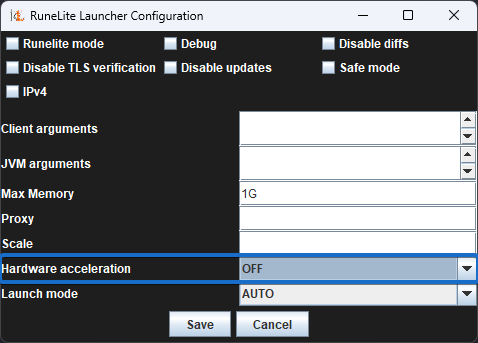
Select OFF in the dropdown menu for Hardware acceleration inside the configuration window (refer to the image below) launched by using the RuneLite (configure) shortcut. For Windows, this can be quickly found by searching for it in the Start menu.
¶ Method 2: Passing a CLI argument (advanced users only)
--mode=OFF can be passed to the launcher to disable HW acceleration directly. This needs to be used in conjunction with a batch file.
Example:start javaw -jar hydra-launcher-3.1.0.jar --mode=OFF
You can read more about client arguments here.
¶ Anti Aliasing
If disabling HWA didn't resolve your issue, try disabling the 'Anti Aliasing' option within the GPU plugin.